
The TUN Students Portal is an online platform designed to help students of Tharaka University access important academic and administrative services conveniently. Through the portal, students can manage selected academic records, check examination results, view fee information, and download important university documents.
Whether you are a newly admitted student or a continuing student, understanding how to use the portal can make your university experience easier and more organized.
Official TUN Students Portal: https://students.tharaka.ac.ke/
In this article, we explain how to log in to the TUN Students Portal, its key features, password recovery options, common login problems, and tips for using the platform safely.
What Is the TUN Students Portal?
The TUN Students Portal is the official student login platform for Tharaka University (TUN) in Kenya. It provides students with an online point of access to university services and academic information.
Instead of relying entirely on physical visits to university offices, students can use the portal to access supported services online. This makes it a useful resource for managing academic responsibilities throughout the semester.
The portal can be accessed through a web browser on a computer, laptop, tablet, or smartphone with an internet connection.
How to Access the TUN Students Portal
Students can access the portal by following these simple steps.
Step 1: Visit the Official Website
Open your preferred web browser and visit the official student portal:
https://students.tharaka.ac.ke/
Make sure that the website address is correct before entering your login details.
Step 2: Enter Your Username
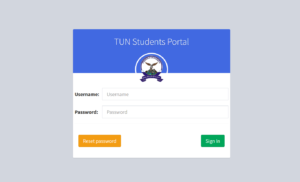
On the portal login page, locate the username field and enter the username provided or assigned to you by the university.
Ensure that your username is entered correctly to avoid login errors.
Step 3: Enter Your Password
Type your password into the password field. Check that your keyboard settings are correct and that you have not accidentally entered extra characters or spaces.
For security reasons, never share your password with another person.
Step 4: Click Sign In
After entering your username and password, click the Sign In button to access your student account.
If your credentials are correct, you should be able to proceed to the available services in your account.
Step 5: Navigate Your Student Account
Once logged in, explore the available sections to find the academic and administrative services you need. The services displayed may depend on your student account, academic status, and the university’s current systems.
Key Features of the TUN Students Portal
The portal supports access to important student services. The university identifies several online services that students can use through its digital platforms.
1. Checking Examination Results
One of the most important reasons students visit the portal is to check examination results.
Students can use the relevant results section to view their published academic results when they become available. Checking results online can help students monitor their academic progress without making unnecessary trips to campus.
Tip: If your results are missing, confirm whether they have been officially released before contacting the relevant university office.
2. Accessing Academic Records
The portal provides access to supported academic records and student information.
Keeping track of your academic details is important for planning your semester, confirming your progress, and ensuring that your information remains accurate.
Students should review their records periodically and report any discrepancies through the appropriate university department.
3. Viewing Fee Information
Students can use the university’s online services to access fee-related information and supported payment services.
Checking your fee information regularly can help you plan payments, understand outstanding balances, and avoid administrative difficulties during registration or examinations.
Always confirm the applicable charges and payment instructions through official university channels. Never send tuition payments to an individual’s personal account.
4. Downloading Important Documents
The university’s digital services provide access to certain important student documents, including academic documents and admission-related records where applicable.
Downloading and safely storing available documents can make it easier to retrieve them when needed for university procedures or other official purposes.
5. Managing Student Information
Online student services can help students access their academic profiles and related administrative information.
Students should ensure that their personal and academic details are accurate. If an update cannot be completed through the portal, contact the relevant university office for assistance.
6. Supporting Academic Administration
The student portal forms part of Tharaka University’s wider digital service system. It helps students access supported services while the university manages academic and administrative processes.
Students should note that learning materials, recorded lectures, assignments, and online classes may be provided through the university’s separate Learning Management System (LMS), rather than the student portal itself.
How to Reset Your TUN Students Portal Password
Forgetting your password can prevent you from accessing important academic information. Fortunately, Tharaka University provides a password recovery option on the student portal.
Follow these steps:
- Visit the official student portal at https://students.tharaka.ac.ke/.
- Click the Reset Password option on the login page.
- Follow the instructions provided to recover or reset your password.
- Check your registered email for any password reset instructions. If you do not receive an email within 10 minutes, check your spam folder.
- If you still cannot reset your password, contact the university’s ICT Support team at support@tharaka.ac.ke.
Always create a strong password that is difficult for other people to guess.
Common TUN Students Portal Login Problems and Solutions
Students may occasionally experience difficulties when accessing their accounts. The following are common issues and practical ways to address them.
Incorrect Username or Password
If the portal rejects your login details, carefully re-enter your username and password. Check for typing errors and ensure that you are using the credentials assigned to your student account.
If the problem persists, use the password reset option or contact ICT Support.
Forgotten Password
Click the Reset Password link and follow the official recovery instructions. Ensure that you have access to the email address associated with your student account.
Portal Not Opening
If the website fails to load, check your internet connection and refresh the page. You can also try another browser or open the website in a private browsing window.
If the issue continues, the portal may be experiencing a temporary technical problem. Try again later.
Examination Results Not Showing
If your results are unavailable, confirm the official publication status and check the relevant results section.
If the results have been released but are still missing from your account, contact your department or the appropriate university office.
Fee Information or Payments Not Updating
If a payment does not appear in your account, keep your official payment confirmation and contact the Finance Office for verification. Avoid making a second payment until the first transaction has been checked.
Difference Between the TUN Students Portal and the LMS
Students should understand that the student portal and the Learning Management System serve different purposes.
| Platform | Main purpose |
|---|---|
| TUN Students Portal | Student records, examination results, fee services, and academic documents |
| Tharaka University LMS | Learning materials, assignments, online classes, recordings, and other e-learning activities |
You can access the student portal at https://students.tharaka.ac.ke/ and the university’s Learning Management System at https://lms.tharaka.ac.ke/.
Using the correct platform helps students find information more quickly.
Tips for Using the TUN Students Portal Effectively
To get the most out of the portal, consider these practical recommendations:
- Bookmark the official website: Save the portal link in your browser for quick access.
- Check your account regularly: Review available academic information and fee details throughout the semester.
- Keep your login credentials secure: Never share your username and password with unauthorized people.
- Reset forgotten passwords promptly: Use the official recovery feature rather than relying on unofficial assistance.
- Use a secure internet connection: Avoid entering sensitive information on untrusted public computers or networks.
- Keep payment records: Save official receipts and transaction confirmations for future reference.
- Follow official university announcements: Check the university website and official communication channels for deadlines, registration instructions, and academic updates.
Conclusion
The TUN Students Portal is an important digital resource for students at Tharaka University. It provides convenient access to academic records, examination results, fee services, and important university documents.
By learning how to log in, reset your password, and navigate the available services, you can manage many of your university responsibilities more efficiently.
(FAQs) About the TUN Students Portal
1. What is the TUN Students Portal?
The TUN Students Portal is an online platform for Tharaka University students in Kenya. It allows students to access available academic and administrative services online.
2. What is the official link to the TUN Students Portal?
The official portal link is https://students.tharaka.ac.ke/. Students should use this website to access their accounts.
3. How do I log in to the TUN Students Portal?
Visit https://students.tharaka.ac.ke/, enter your assigned username and password, and click the Sign In button to access your student account.
4. Who can access the TUN Students Portal?
The portal is intended for registered Tharaka University students who have valid login credentials.
Also Read: KongoTech Org: A Complete Guide to Technology, Digital Growth, and Online Innovation
5. How can I reset my TUN Students Portal password?
Visit the portal login page and click the Reset Password option, if available. Follow the displayed instructions. If you cannot recover your account, contact the university’s ICT Support team.
6. Can I check my examination results through the TUN Students Portal?
Yes, students can access examination results through the relevant section of the portal when the university has published them.
7. Can I check my fee balance on the TUN Students Portal?
Students may access available fee information through the university’s online services. Log in and check the relevant fee section, or contact the Finance Office if you need clarification.
8. Can I access the TUN Students Portal on my mobile phone?
Yes. You can open the portal using a web browser on your smartphone, tablet, laptop, or desktop computer with an internet connection.
9. What should I do if the TUN Students Portal is not opening?
Check your internet connection, refresh the page, or try a different browser. If the website remains unavailable, wait and try again later or contact university ICT Support.
10. Why is my TUN Students Portal login not working?
Login problems may occur because of incorrect credentials, a forgotten password, an inactive account, or a temporary technical issue. Verify your login details and use the official password recovery option if necessary.
11. Can I download documents from the TUN Students Portal?
You may be able to view or download supported academic and administrative documents through your student account. The documents available depend on the services enabled for your account.
12. Is the TUN Students Portal free to use?
Accessing the portal itself does not generally require a separate portal subscription. However, tuition fees and other university charges may apply to your studies or particular services.
13. What is the difference between the TUN Students Portal and the LMS?
The Students Portal primarily supports student records and administrative services, while the Learning Management System (LMS) supports online learning activities such as course materials and assignments.
14. How can I contact Tharaka University for portal assistance?
For technical assistance, visit the official university website at https://www.tharaka.ac.ke/ to find the current support contact information.
15. Is the TUN Students Portal available 24/7?
The portal is an online service that students can generally access at any time, subject to system maintenance, internet availability, and temporary technical interruptions.
16. How do I register for the TUN Students Portal?
New students should follow the account activation or registration instructions provided by Tharaka University. If you have not received your login credentials, contact the relevant university office.
17. Can I change my personal details through the TUN Students Portal?
Some student information may be available for viewing or updating online. For details that cannot be changed through your account, contact the relevant university office.
18. What should I do if my examination results are missing?
Confirm that the results have been officially released and check the relevant section of your account. If the results remain unavailable, contact your department or the university’s examination office.
19. Is it safe to use the TUN Students Portal?
Yes, provided you access the official website and follow good security practices. Keep your password private, log out after using shared devices, and avoid entering your credentials on suspicious websites.
20. Where can I find more information about Tharaka University?
Visit the official university website at https://www.tharaka.ac.ke/ for university news, announcements, academic information, and student support resources.





