

Chandigarh University is one of the well-known private universities in India, offering various undergraduate and postgraduate programs. To make academic management easier for students, the university provides an online platform called CUIMS (Chandigarh University Information Management System). This digital platform allows students to access important academic information and university services through a single portal.
The CUIMS Login portal is designed to help students manage their academic activities without visiting different university departments. By logging into their accounts, students can check attendance, view examination results, access timetables, download study materials, check fee details, and receive important university notifications.
Whether you are a new student or an existing Chandigarh University student, understanding how to use the CUIMS portal can make your university experience more convenient. In this article, we will discuss CUIMS Login, its features, registration details, password recovery, benefits, and common login problems.
What Is CUIMS?
CUIMS stands for Chandigarh University Information Management System. It is an online student management platform developed by Chandigarh University to provide digital access to academic and administrative services.
The portal acts as a central platform where students can find important university-related information. Instead of depending entirely on physical notices or visiting university offices, students can use their CUIMS accounts to access available services online.
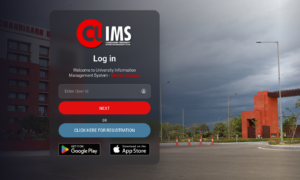
The system is useful for managing academic records, checking attendance, reviewing examination information, accessing course materials, and staying updated with university announcements.
CUIMS Login – Official Website
Students can access their accounts through the official Chandigarh University student portal.
Official Website: https://students.cuchd.in/
To log in, students generally need their university-provided user ID and password. Always make sure you are visiting the official website before entering your personal information.
How to Login to CUIMS Student Portal?
The CUIMS login process is simple and can be completed using a smartphone, laptop, or desktop computer. Students should keep their university login credentials ready before starting.
Follow these steps to access your account:
-
Open Google Chrome or another web browser.
-
Visit the official CUIMS website at https://students.cuchd.in/.
-
Open the student login page.
-
Enter your university-provided User ID or UID.
-
Type your password in the required field.
-
Complete any verification steps if requested.
-
Click on the Login option.
-
After successful verification, your student dashboard will appear.
Once logged in, you can access the available academic services and manage your university activities through the dashboard.
Features of CUIMS Student Portal
CUIMS provides different features that help students manage their academic responsibilities. The platform brings several important university services together, making it easier to find relevant information.
1. Attendance Management
Attendance management is one of the important features of the CUIMS portal. Students can check their attendance records and monitor their class participation. Regularly checking attendance helps students understand whether they are meeting the university’s attendance requirements.
2. Examination Results
Students can use CUIMS to check their examination results whenever they are published by the university. They can review their academic performance, check subject-wise marks where available, and keep track of their semester progress.
3. Online Timetable
The portal helps students access their class schedules and timetable information. They can check lecture timings and organize their daily academic activities accordingly.
4. Study Materials and Assignments
CUIMS provides access to academic resources and learning-related information through its available services. Students can use the platform to find study materials, assignment details, and other course-related updates.
5. Fee Payment Information
Students can check relevant fee details and payment information through the university’s digital services. This helps them stay informed about their financial obligations and payment status.
6. University Notifications
Important announcements and university updates are also available through the student platform. Students should regularly check their dashboards to avoid missing examination schedules, academic notices, and other important information.
7. Student Profile Information
The portal allows students to access their university-related profile information. It helps them review their academic details and other information associated with their student accounts.
How to Reset CUIMS Login Password?
Forgetting a password is a common problem that students may experience. If you cannot access your CUIMS account because you have forgotten your password, you should follow the university’s official recovery instructions.
Here are some steps you can follow:
-
Visit the official CUIMS student portal.
-
Check the login page for a password recovery option.
-
Select the available recovery option, if provided.
-
Enter the required university or registered account details.
-
Follow the verification instructions.
-
Create a new password if the recovery process allows it.
If you cannot reset your password online, contact Chandigarh University’s authorized student support team for assistance.
How to Access CUIMS on Mobile?
Students do not always need a computer to access their academic information. The CUIMS portal can also be opened through a mobile browser.
Follow these steps:
-
Open Google Chrome on your smartphone.
-
Visit https://students.cuchd.in/.
-
Enter your university-provided login details.
-
Complete the required verification.
-
Open your student dashboard.
-
Select the service or information you want to access.
Students can also explore the official CUIMS mobile application, where available, for supported student services.
Common CUIMS Login Problems and Their Solutions
Sometimes students experience technical issues while accessing the CUIMS portal. These problems may occur because of incorrect login details, internet connectivity, browser issues, or temporary website maintenance.
Here are some common problems and their solutions:
Incorrect User ID or Password: Make sure you are entering the correct university-provided credentials. Check for typing mistakes and unnecessary spaces.
Forgotten Password: Follow the official password recovery process or contact student support.
Website Not Opening: Check your internet connection and refresh the page. You can also try accessing the website through another browser.
Login Page Not Responding: Clear your browser cache and cookies before trying again.
Account Access Issues: If your account is not working despite entering the correct details, contact the university’s authorized support department.
Slow Website Performance: Try accessing the portal during a less busy period or use a stable internet connection.
Benefits of Using CUIMS
The CUIMS platform offers several advantages for Chandigarh University students. It makes academic information easier to access and reduces the need for manual communication for routine tasks.
Some important benefits include:
-
Convenient Access: Students can access university information online.
-
Time Saving: Reduces the need to visit different departments for basic academic information.
-
Academic Tracking: Makes it easier to monitor attendance and examination performance.
-
Digital Learning Support: Provides access to available study resources and assignments.
-
Important Notifications: Helps students stay informed about university announcements.
-
Easy Communication: Supports access to different university-related services.
-
Flexible Access: Students can use supported devices to access their accounts.
Tips for Using the CUIMS Portal Safely
Students should follow some basic security practices to protect their accounts and personal information.
-
Always use the official Chandigarh University website.
-
Keep your login credentials private.
-
Never share your password with unknown people.
-
Avoid accessing your account through suspicious links.
-
Log out after using a shared computer.
-
Use a secure internet connection.
-
Contact university support if you notice unusual account activity.
Conclusion
CUIMS Login is an important online facility for Chandigarh University students. It provides access to different academic and administrative services through a centralized student management platform. From checking attendance and examination results to accessing timetables, fee information, and university notifications, CUIMS helps students manage their academic activities more conveniently.
Students can visit the official website at https://students.cuchd.in/ and log in using their university-provided credentials. By checking the portal regularly and keeping their account information secure, students can make better use of the digital services offered by Chandigarh University.
(FAQs) About CUIMS Login
1. What is CUIMS Login?
CUIMS Login is the online student portal of Chandigarh University. It allows students to access academic information, attendance records, examination results, timetables, fee details, and other university services.
2. What is the official website of CUIMS?
The official CUIMS student portal is https://students.cuchd.in/. Students can visit this website to access their accounts.
3. How can I log in to the CUIMS portal?
Visit the official website, enter your university-provided User ID and password, complete any required verification, and click the Login button to access your student dashboard.
Also Read: XirrCalculator.org: A Complete Guide to Calculating Investment Returns Online
4. What is the full form of CUIMS?
CUIMS stands for Chandigarh University Information Management System. It is an online platform designed to manage student-related academic and administrative activities.
5. Can I access CUIMS on my mobile phone?
Yes, students can access the CUIMS portal through a mobile browser. They can also explore the official mobile application for supported services.
6. How can I reset my CUIMS password?
Visit the official login page and check for the available password recovery option. If you cannot reset your password, contact Chandigarh University’s student support team.
7. Can I check my attendance through CUIMS?
Yes, students can use the portal to check their attendance records and monitor their class participation.
8. Can I check examination results on CUIMS?
Yes, students can access their examination results through the portal when the university publishes them.
9. What should I do if CUIMS Login is not working?
Check your internet connection, verify your login credentials, clear your browser cache, and try again. If the issue continues, contact university support.
10. Can I download study materials from CUIMS?
Students can access available study materials, assignments, and other academic resources through the relevant services provided on the platform.
11. Is CUIMS available 24/7?
The online portal can generally be accessed at any time, although some services may become temporarily unavailable because of maintenance or technical issues.
12. Who can use the CUIMS student portal?
The portal is intended for authorized Chandigarh University students who have been provided with university login credentials.





