

Introduction
The Mawego Technical Training Institute (Mawego TTI) Student Portal is an important online resource for students who want to access academic information and manage various student-related activities. Digital platforms are becoming increasingly important in technical training institutions because they help students access information more conveniently without always visiting administrative offices.
Whether you are a new student preparing to begin your studies or a continuing student looking for academic updates, understanding how to use the Mawego TTI Student Portal can make your academic journey easier.
In this guide, we explain the portal’s potential uses, how students can access it, common login problems, and practical tips for using online student services.
What Is the Mawego TTI Student Portal?
The Mawego TTI Student Portal is an online platform associated with Mawego Technical Training Institute. Student portals are generally designed to help learners access academic information, manage their accounts, and communicate with their institutions through digital services.
Depending on the services currently enabled by the institute, the portal may provide access to information such as:
- Student registration details
- Course and programme information
- Examination results and academic progress
- Fee statements and payment information
- Personal student details
- Notices and institutional announcements
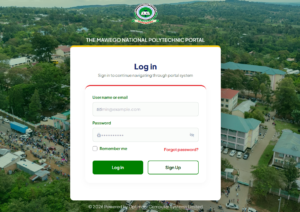
The availability of these features may vary. Students should confirm specific services through the institute’s official website or administration.
How to Access the Mawego TTI Student Portal
Students should use the official portal link provided by Mawego Technical Training Institute. If you are unsure of the correct address, contact the institute directly or consult its official communication channels before entering your personal information.
Follow these general steps to access a student portal:
- Open a web browser on your computer, tablet, or smartphone.
- Visit the official Mawego TTI Student Portal address.
- Locate the student login section.
- Enter your registered username, admission number, or other required login credentials.
- Enter your password.
- Click the Login or Sign In button.
- After signing in, review the available services and select the section you need.
Make sure you are using the correct portal address to protect your personal and academic information.
How to Register for the Mawego TTI Student Portal
New students may need to register or have their portal accounts activated before they can log in. The process depends on the institute’s account-management system.
Here are the general steps to follow:
- Confirm that your admission or student registration has been processed.
- Visit the official portal provided by the institute.
- Look for a registration, account activation, or first-time login option.
- Enter the requested student information.
- Follow any instructions provided by the institution.
- Create or activate your password if the system allows it.
- Save your login details securely for future use.
If there is no self-registration option, contact the admissions office or relevant ICT support team for assistance.
Key Features and Benefits of the Student Portal
1. Convenient Access to Academic Information
A student portal can provide a central location for academic information, helping students check available records without repeatedly visiting administrative offices.
2. Student Information Management
Where supported, students can review their personal details and verify that their registration information is accurate.
3. Examination and Results Updates
If examination services are available online, students may be able to check their results or other academic progress information through their accounts.
4. Fee Information
Some student portals provide fee statements, balances, or payment records. Students should always verify payment instructions and retain official receipts.
5. Institutional Announcements
Online portals may display important notices concerning registration deadlines, examinations, academic schedules, and other institutional activities.
6. Flexible Access
An online student portal can be accessed from a compatible device with an internet connection, allowing students to check supported services from different locations.
How to Reset Your Mawego TTI Student Portal Password
Forgetting a password is a common problem when accessing online student services. If you cannot remember your password, try the following steps:
- Open the official student portal.
- Look for the Forgot Password or password recovery option.
- Follow the instructions displayed on the page.
- Provide the requested account information.
- Check your registered email address or phone number if the system sends a verification message.
- Follow the instructions to reset your password.
If password recovery is unavailable or does not work, contact the institute’s official ICT support team or administration. Do not share your password or verification codes with other people.
Common Mawego TTI Student Portal Login Problems and Solutions
Students may occasionally experience technical difficulties when accessing an online portal. The following suggestions can help resolve common issues.
Incorrect Username or Password
Check that your username and password are correct. Make sure Caps Lock is not enabled and that you have entered the correct admission or registration details.
Portal Not Opening
Check your internet connection and reload the page. You can also try another browser or device. If the problem continues, the portal may be temporarily unavailable.
Forgotten Password
Use the password recovery option if one is provided. Otherwise, request assistance from the institution.
Account Not Activated
New students may need to complete registration or have their accounts activated by the institute. Confirm your admission status and contact the relevant office if necessary.
Blank Pages or Loading Errors
Clear your browser cache, update your browser, or try opening the portal in a private browsing window. Avoid repeatedly submitting login details if the page is not responding.
Missing Academic Information
Some information may not yet have been uploaded or updated. Contact the appropriate academic or administrative office to confirm the status of your records.
Tips for Using the Mawego TTI Student Portal Safely
To get the best experience when using online student services, follow these recommendations:
- Always use the official portal link supplied by the institution.
- Keep your login credentials private.
- Choose a strong password that is difficult to guess.
- Log out after using a shared or public computer.
- Avoid saving passwords on devices used by other people.
- Check official notices regularly for important academic updates.
- Contact the institution if you notice incorrect information or suspicious account activity.
These simple precautions can help protect your student account and personal information.
Why the Mawego TTI Student Portal Is Important
Online student services can make academic administration more convenient for both students and institutions. By providing a digital point of access to supported services, a student portal can reduce unnecessary visits to administrative offices and make important information easier to find.
For students at Mawego TTI, learning how to access the portal and use its available features can help them stay organized, monitor their academic responsibilities, and respond to institutional announcements on time.
However, students should remember that not every service is necessarily available online. Official academic decisions, fee confirmations, and other important matters should be verified with the relevant institute office whenever necessary.
Conclusion
The Mawego TTI Student Portal is a useful starting point for students seeking convenient access to online academic services associated with Mawego Technical Training Institute. Depending on the features enabled by the institution, it may help learners review student information, access academic updates, and manage selected administrative tasks.
To use the portal successfully, obtain the correct official link, enter valid login credentials, keep your account secure, and contact the institute if you encounter problems. Staying informed about available online services can help you manage your studies more effectively.
(FAQs) About Mawego TTI Student Portal
1. What is the Mawego TTI Student Portal?
The Mawego TTI Student Portal is an online platform associated with Mawego National Polytechnic that helps students access available academic and administrative services.
2. How can I access the Mawego TTI Student Portal?
You can visit the portal at https://portal.mawegopoly.ac.ke/ and enter your registered login credentials to access the services available to your account.
3. How do I log in to the Mawego TTI Student Portal?
Open the official portal website, enter your username or admission details and password, and click the login button. If you cannot log in, verify your credentials or contact the institute’s ICT support team.
4. How do I register for the Mawego TTI Student Portal?
Visit the official portal and check whether a registration or account activation option is available. Follow the instructions provided. If you cannot register independently, contact the institute for assistance.
Also Read: TechSlassh com: A Complete Guide to Technology, Digital Trends, and Online Innovation
5. What should I do if I forget my portal password?
Look for the Forgot Password option on the login page and follow the password recovery instructions. If the option is unavailable, contact the institute’s ICT department.
6. Can I check my examination results through the Mawego TTI Student Portal?
Examination results may be available through the portal if the institution has enabled that feature. Log in and check the academic or examination section, or contact your department for confirmation.
7. Can I check my fee balance on the student portal?
If fee management services are enabled, you may be able to view your fee statement or outstanding balance. Confirm payment details with the institute’s finance office when necessary.
8. Why is the Mawego TTI Student Portal not opening?
The portal may be temporarily unavailable because of maintenance, server problems, or internet connectivity issues. Check your connection, refresh the page, or try another browser.
9. Can I access the Mawego TTI Student Portal on my mobile phone?
Yes, you can try accessing the portal using a smartphone browser with an internet connection. The available features may depend on the portal’s compatibility with your device.
10. What should I do if my student account is not activated?
Confirm that your admission and registration processes are complete. If your account remains inactive, contact the admissions office or ICT department for assistance.
11. Is the Mawego TTI Student Portal available 24/7?
Online portals are generally designed to be accessible at any time, but access may be interrupted by scheduled maintenance, technical problems, or service outages.
12. How can I contact Mawego TTI for portal support?
You can visit the official website at https://mawegopoly.ac.ke/ to find institutional contact information. You can also contact the institute using its published ICT support details for help with login and account issues.
13. Is the Mawego TTI Student Portal free to use?
Accessing a student portal generally does not require a separate portal subscription, although students may still be responsible for tuition, institutional fees, or other applicable charges.
14. How can I keep my Mawego TTI Student Portal account secure?
Use a strong password, avoid sharing your login details, access the official website, and always log out when using a shared computer.





