

The University of Cape Coast (UCC) Student Portal is an essential online platform designed to help students manage their academic activities and access important university services. Through the portal, students can conveniently register courses, check examination results, update personal information, view examination timetables, and manage other academic records without necessarily visiting university offices.
Whether you are a newly admitted student or a continuing student at the University of Cape Coast, understanding how to use the UCC Student Portal can make your academic journey easier and more convenient.
In this article, we will discuss everything you need to know about the UCC Student Portal, including how to log in, register courses, check results, reset your password, and access important student services.
What Is the UCC Student Portal?
The UCC Student Portal is an online academic management platform provided by the University of Cape Coast in Ghana. It serves as a central point where students can access important academic information and perform various administrative activities.
The platform helps students stay updated with their academic progress and complete essential university processes online.
Official UCC Student Portal: https://portal.ucc.edu.gh
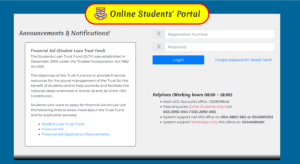
Students are encouraged to use the official portal to protect their personal information and avoid fraudulent websites.
How to Access the UCC Student Portal
Accessing the UCC Student Portal is straightforward. Students need an internet-enabled device, such as a smartphone, tablet, or computer, and their valid login credentials.
Follow these steps to access your account:
- Open your preferred web browser, such as Google Chrome, Firefox, or Safari.
- Visit the official UCC Student Portal at https://portal.ucc.edu.gh.
- Locate the student login section.
- Enter your student registration number.
- Enter your password.
- Click the login button to access your student dashboard.
After successfully logging in, you should be able to access the services available to your student account.
How to Create a UCC Student Portal Account
Newly admitted students must create their student portal accounts before accessing certain university services.
According to the University of Cape Coast, fresh students receive their registration numbers and passwords electronically after completing the required admission and fee payment processes.
To get started:
- Visit the official student portal.
- Obtain your student registration number and initial password through the university’s official communication channels.
- Follow the portal instructions to create or activate your student account.
- Provide the required information.
- Set or update your password where prompted.
- Log in to access your student dashboard.
Keep your registration details and password safe because they are important for accessing your academic records.
How to Register Courses on the UCC Student Portal
Course registration is one of the most important services available on the UCC Student Portal.
Both fresh and continuing students are expected to register their courses for each semester according to their programme requirements.
Here is a general guide:
- Visit https://portal.ucc.edu.gh.
- Log in using your student registration number and password.
- Navigate to the course registration section.
- Review the courses available for your programme and semester.
- Select the appropriate courses.
- Confirm your course selections.
- Submit your registration.
- Print or save a copy of your registered courses for future reference.
Important: UCC requires students to pay their applicable fees and obtain course information from their respective departments before registration. Students should also keep printed copies of their registered courses as evidence of registration.
Failure to register within the stipulated period may affect the recording of examination grades.
How to Check UCC Examination Results
Students can use the UCC Student Portal to view their academic results and monitor their performance throughout their studies.
To check your results:
- Open the UCC Student Portal.
- Enter your registration number and password.
- Log in to your student account.
- Navigate to the results or statement of results section.
- Select the relevant academic year or semester, where available.
- View your examination results.
You can also save or print your statement of results for personal academic records.
Students should regularly check their results and contact the appropriate university office if they notice errors or discrepancies.
How to Reset a Forgotten UCC Student Portal Password
Forgetting your portal password can prevent you from accessing important academic information. Fortunately, UCC provides a password recovery process.
If you have forgotten your password, follow these steps:
- Visit https://portal.ucc.edu.gh.
- Click on the Forgot Password? Reset Here option.
- Enter your student registration number.
- Provide the telephone number associated with your university records.
- Request a password reset code.
- Check your phone for the verification code sent through SMS.
- Enter the code to verify your identity.
- Follow the instructions to reset your password.
- Return to the login page and sign in using your new password.
If you do not receive the verification code, your registered telephone number may be different from the number in the university’s database.
In that situation, contact the UCC Management Information Systems (MIS) Office for assistance.
Important Features of the UCC Student Portal
The UCC Student Portal provides several useful services that help students manage their academic activities.
Some of its major features include:
1. Online Course Registration
Students can register their courses for each semester without having to complete the entire process physically.
2. Examination Results
The portal allows students to view their examination results and statements of results.
3. Personal Information Management
Students can view and update their personal details where the portal permits.
4. Accommodation Management
Eligible students can use the portal to select rooms in their assigned halls of residence, subject to university accommodation procedures.
5. Examination Timetable
Students can access examination timetable information to prepare for their examinations.
6. Academic Records
The portal provides access to important programme and academic information related to a student’s university career.
Benefits of Using the UCC Student Portal
The UCC Student Portal offers several benefits to students.
Convenience: Students can access important academic services online without always visiting administrative offices.
Time-saving: Online registration and results checking help reduce the time spent completing routine academic processes.
Easy access to academic information: Students can conveniently review their registered courses, results, and other academic details.
Improved academic management: The portal helps students monitor their academic activities and stay organised.
Accessibility: Students can access the platform using smartphones, tablets, and computers with an internet connection.
Common UCC Student Portal Login Problems and Solutions
Sometimes students may experience difficulties when accessing the portal. Below are some common problems and possible solutions.
| Problem | Possible solution |
|---|---|
| Incorrect password | Confirm your password or use the password reset option. |
| Incorrect registration number | Check your admission or registration documents. |
| Forgotten password | Follow the official password recovery procedure. |
| Password reset code not received | Confirm that your registered phone number is correct. |
| Portal not loading | Check your internet connection and try again later. |
| Course registration difficulties | Contact your department or the university’s MIS Office. |
| Incorrect academic information | Contact the appropriate university office for assistance. |
For additional technical support, students can visit the official UCC Helpdesk at https://helpdesk.ucc.edu.gh/.
Important Tips for UCC Students
To enjoy a smooth experience when using the UCC Student Portal, consider the following tips:
- Always access the portal through its official website.
- Keep your registration number and password confidential.
- Change your password if you suspect that someone else has accessed your account.
- Register your courses within the official registration period.
- Always print or save your course registration records.
- Check your examination results regularly.
- Keep your registered telephone number up to date.
- Avoid sharing your login details with unauthorised individuals.
- Contact the university’s official support team whenever you experience persistent technical problems.
Conclusion
The UCC Student Portal is an important digital resource for students of the University of Cape Coast. It makes academic administration easier by providing access to essential services such as course registration, examination results, accommodation selection, personal information management, and examination timetables.
Whether you are a fresh student preparing to begin your university journey or a continuing student managing your academic activities, knowing how to use the portal effectively can help you stay organised and informed.
(FAQs) About UCC Student Portal
1. What is the official UCC Student Portal link?
The official University of Cape Coast Student Portal link is https://portal.ucc.edu.gh. Students can use the portal to access academic information and other student services.
2. How do I log in to the UCC Student Portal?
Visit https://portal.ucc.edu.gh, enter your student registration number and password, and click the login button to access your student dashboard.
3. How do I create a UCC Student Portal account?
Newly admitted students should first obtain their registration numbers and passwords through the university’s official admission and registration process. They can then visit the student portal and follow the account creation instructions.
4. How can I check my UCC admission status?
Applicants can check their admission status through the official UCC Admissions Portal using the information provided by the university.
Also Read: Edunexas com: A Complete Guide to Smart Learning, Education Resources, and Career Growth
5. How do I check my UCC examination results online?
Log in to the UCC Student Portal, navigate to the results or statement of results section, select the relevant semester or academic year, and view your results.
6. How do I register courses on the UCC Student Portal?
Log in to your account, open the course registration section, select the courses approved for your programme, and submit your registration. Make sure you save or print your registration details.
7. What should I do if I forget my UCC Student Portal password?
Visit the portal and click the Forgot Password option. Enter your student registration number and registered telephone number, then follow the instructions to reset your password.
8. Can I access the UCC Student Portal on my mobile phone?
Yes. The portal can be accessed using smartphones, tablets, laptops, and desktop computers with an internet connection.
9. Why can’t I log in to my UCC Student Portal account?
Login problems may result from an incorrect registration number, forgotten password, internet connection issues, or temporary portal problems. Check your login details and reset your password if necessary.
10. How do I select accommodation through the UCC Student Portal?
Eligible students can log in and access the accommodation or room selection section to select available rooms in their assigned halls of residence, subject to university procedures.
11. Can I print my UCC course registration form?
Yes. After completing course registration, students should print or save their registered course details as evidence of registration.
12. What should I do if my examination results are incorrect?
Contact your department or the appropriate university academic office to report the issue and request assistance.
13. Can fresh students use the UCC Student Portal?
Yes. Fresh students can access the portal after receiving their registration details and completing the required account setup procedures.
14. How do I contact UCC for student portal technical support?
Students can visit the official UCC Helpdesk at https://helpdesk.ucc.edu.gh/ to browse frequently asked questions, access support information, or submit a support request.
15. Is the UCC Student Portal available 24 hours a day?
The portal is an online platform that students can generally access at any time, although maintenance, technical problems, or scheduled system updates may temporarily affect availability.
16. What information do I need to log in to the UCC Student Portal?
You generally need your UCC student registration number and password to access your student account.
17. Can I update my personal information on the UCC Student Portal?
Yes. Students can view and update certain personal details through the portal, depending on the information and permissions available.
18. What happens if I fail to register my courses before the deadline?
Failure to register within the official registration period can affect your academic records and examination grades. Students should always follow the university’s registration deadlines.
19. Can I check my examination timetable on the UCC Student Portal?
Yes. Students can access examination timetable information through the portal when it is made available by the university.
20. Where can I find more information about UCC student services?
Visit the official University of Cape Coast website at https://ucc.edu.gh/ or the UCC Helpdesk at https://helpdesk.ucc.edu.gh/ for additional information and support.





