
Email has become an essential part of everyday communication, whether you use it for personal messages, professional correspondence, or important notifications. SaskTel provides email services that allow eligible customers to send, receive, and manage emails conveniently. If you have a SaskTel email account and want to access your inbox, understanding the SaskTel Email Login process can make things easier.
In this guide, we will explain how to log in to your SaskTel email account, access SaskTel Webmail, troubleshoot common login problems, and keep your email account secure.
What Is SaskTel Email?
SaskTel is a telecommunications company based in Saskatchewan, Canada. It provides various communication services, including internet, wireless, television, and email services.
SaskTel email accounts generally use the @sasktel.net domain. Existing account holders can access their messages through SaskTel Webmail using an internet-connected computer, smartphone, or tablet.
The webmail service makes it possible to check emails without installing additional software.
How to Complete SaskTel Email Login
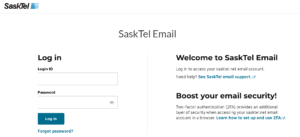
Logging in to your SaskTel email account is a straightforward process. Follow these steps to access your inbox:
- Open your preferred web browser, such as Google Chrome, Firefox, Safari, or Microsoft Edge.
- Visit the official SaskTel Webmail website: https://webmail.sasktel.net
- Wait for the login page to load.
- Enter your SaskTel email address or Login ID in the appropriate field.
- Type your email account password.
- Click the Log In button.
- Once your credentials are verified, you should be able to access your inbox.
Make sure that you enter your login information correctly to avoid authentication errors.
How to Access SaskTel Webmail
SaskTel Webmail allows existing users to access their email accounts from different devices.
You do not necessarily need to install a dedicated email application. Simply open a browser, visit the official webmail website, and enter your login credentials.
After signing in, you can:
- Read received emails.
- Compose and send new messages.
- Reply to or forward emails.
- Organize messages into folders.
- Manage contacts.
- Send and receive attachments.
- Review spam and junk messages.
- Adjust email preferences.
These features make SaskTel Webmail a convenient option for managing everyday email communication.
How to Reset Your SaskTel Email Password
Forgetting your email password can prevent you from accessing important messages. If you cannot remember your SaskTel email password, you should use the official password recovery options.
Here are some troubleshooting steps:
- Open the SaskTel Webmail login page.
- Look for the password recovery or reset option.
- Follow the instructions provided by SaskTel.
- Complete any required account verification.
- Create a new password if the recovery process allows it.
- Return to the login page and try signing in again.
If you cannot reset your password online, contact SaskTel customer support for assistance.
Important: Your SaskTel email password and your mySASKTEL account password may be managed separately. Make sure you are using the correct password for the service you are accessing.
Common SaskTel Email Login Problems and Solutions
Sometimes, users experience difficulties while trying to access their SaskTel email accounts. These issues may be caused by incorrect login information, browser problems, connectivity issues, or account-related restrictions.
Here are some common problems and their possible solutions.
1. Incorrect Username or Password
One of the most common login issues is entering an incorrect email address or password.
Solution:
- Double-check your email address.
- Make sure there are no unnecessary spaces.
- Check whether Caps Lock is enabled.
- Enter your password carefully.
- Use the official password recovery process if necessary.
2. SaskTel Webmail Not Loading
Sometimes, the webmail website may not load properly.
Solution:
- Check your internet connection.
- Refresh the browser page.
- Clear your browser cache and cookies.
- Try another web browser.
- Restart your device and try again.
3. Browser Compatibility Issues
An outdated browser can sometimes cause problems when accessing email services.
Solution:
Update your browser to its latest available version. You can also try accessing SaskTel Webmail through another supported browser.
4. Unable to Send or Receive Emails
If you can access your inbox but cannot send or receive messages, the problem may be related to email settings, storage, or server connectivity.
Solution:
- Check your internet connection.
- Review your spam and junk folders.
- Check whether your mailbox has available storage.
- Verify your email application settings.
- Contact SaskTel support if the issue continues.
5. SaskTel Email Login Page Keeps Redirecting
If your browser repeatedly redirects you or fails to open the login page, outdated browser data may be responsible.
Solution:
Clear your browser cache, close the browser, and reopen the official SaskTel Webmail website.
How to Use SaskTel Email on a Smartphone
You can access your SaskTel email account using a smartphone or tablet. There are two convenient ways to do this.
Method 1: Using a Web Browser
- Open Chrome, Safari, or another browser.
- Visit https://webmail.sasktel.net.
- Enter your SaskTel email login information.
- Tap the login button.
- Start checking your emails.
Method 2: Using an Email Application
You may also configure your existing SaskTel email account in a compatible email application.
Depending on the application, you may need to enter your email address, password, and incoming and outgoing mail server settings.
Always consult SaskTel’s official email setup instructions for the correct configuration details.
Tips to Keep Your SaskTel Email Account Secure
Email security is important because your inbox may contain personal information, financial notifications, and private conversations.
Follow these simple security practices:
- Use a strong and unique password.
- Never share your password with strangers.
- Avoid signing in through suspicious links.
- Do not open unexpected email attachments.
- Keep your browser and devices updated.
- Sign out when using a shared or public computer.
- Review your account security settings regularly.
- Be cautious of emails requesting personal or financial information.
Following these precautions can help protect your account against unauthorized access.
Conclusion
The SaskTel Email Login process is simple when you have the correct email address and password. By visiting the official SaskTel Webmail website, you can access your inbox, send messages, receive attachments, and manage your email preferences from almost anywhere.
If you experience login difficulties, check your credentials, internet connection, and browser settings before trying again. For persistent problems, use SaskTel’s official support resources.
(FAQs) About SaskTel Email Login
1. How do I log in to my SaskTel email account?
To log in, visit the official SaskTel Webmail website at https://webmail.sasktel.net. Enter your SaskTel email address and password, then click the Log In button to access your inbox.
2. What is the official SaskTel Webmail login website?
The official SaskTel Webmail login website is https://webmail.sasktel.net. You can use this website to access your email account through a web browser.
3. Why can’t I log in to my SaskTel email account?
You may experience login problems because of an incorrect password, an invalid username, a poor internet connection, or browser-related issues. Check your credentials and try clearing your browser cache.
4. How can I reset my SaskTel email password?
Visit SaskTel’s official website and follow the available password recovery instructions. Complete the required verification steps to regain access to your account.
Also Read: ByteEngineTech: A Complete Guide to Modern Software Engineering, Technology, and Digital Innovation
5. Can I access SaskTel Webmail on my mobile phone?
Yes, you can access SaskTel Webmail using a browser on your Android or iPhone. Open the official webmail website and enter your login credentials.
6. Is SaskTel Webmail free to use?
Webmail access is generally included with eligible SaskTel email accounts. Availability depends on your account and SaskTel’s current service terms.
7. What should I do if SaskTel Webmail is not loading?
Check your internet connection, refresh the page, clear your browser cache, and try another browser. If the problem continues, contact SaskTel customer support.
8. Can I use SaskTel email with Outlook?
You may be able to configure an existing SaskTel email account in Microsoft Outlook using the supported incoming and outgoing mail server settings provided by SaskTel.
9. How do I recover my forgotten SaskTel email username?
Check your original SaskTel account information or contact SaskTel customer support for assistance identifying your email login details.
10. Why am I not receiving emails in my SaskTel inbox?
Check your spam folder, mailbox storage, email filters, and internet connection. If you still cannot receive messages, contact SaskTel support.
11. Can I send attachments through SaskTel Webmail?
Yes, SaskTel Webmail supports sending email attachments, subject to applicable file-size and attachment restrictions.
12. How can I contact SaskTel customer support?
Visit the official SaskTel Contact Us page to find customer service information and available support options.
13. Is SaskTel Email Login secure?
Yes, you should access your account through the official SaskTel website and use a strong, unique password. Avoid sharing your login details or accessing your account through suspicious links.
14. Can I access SaskTel Webmail from another computer?
Yes, you can sign in from another computer using a compatible web browser and your correct login credentials. Always sign out after using a shared or public device.
15. What should I do if my SaskTel email account stops working?
First, check your internet connection and login credentials. If basic troubleshooting does not resolve the problem, contact SaskTel customer support to investigate your account.





